Getting started
Scaffold is a FPGA board made for security research on hardware embedded devices. It is capable of communicating with many circuits using standard protocols. It can be easily extended with new protocols by writing new transceivers in VHDL or Verilog language, and integrating it in the proposed scaffold global architecture. When exchanging messages with the devices under tests, Scaffold can generate triggers for chosen commands, spy data on a bus or intercept and traffic.
Scaffold board also embeds special electronics tailored for hardware attacks:
Sense resistor and analog amplifier for real-time current measurement
FPGA safety protections against voltage glitch attacks
Controllable power switches
Fast power tearing capability, for emergency shutdown of the device under test
Delay and pulse generators, allowing firing glitches or laser pulses.
An easy-to-use python API is provided to control the board. https://github.com/Ledger-Donjon/scaffold
Board tour
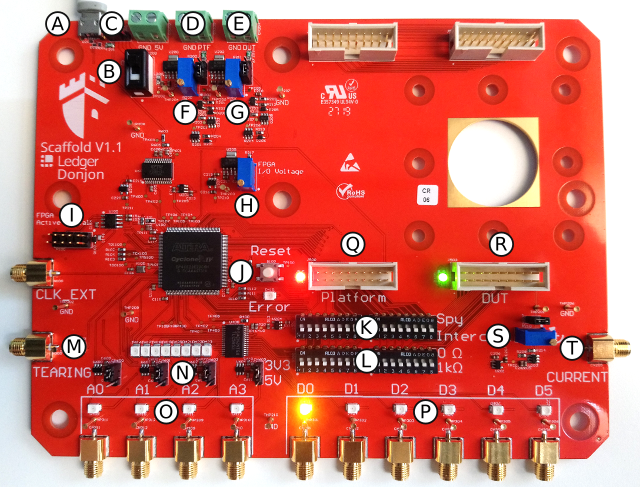
A: USB2 link with host computer. Also used to power the board.
B: Main board power switch.
C: Switch the jumper to the right to power the board from an external 5 V power supply and not from the USB.
D: External power supply for the platform socket.
E: External power supply for the DUT socket.
F: Adjustable voltage regulator for the platform socket. When the jumper is set on top position, this power source is not used and the platform socket is powered from the external power supply.
G: Adjustable voltage regulator for the DUT socket. When the jumper is set on top position, this power source is not used and the DUT socket is powered from the external power supply.
H: Adjustable voltage regulator for the I/O bank of the FPGA connected to the platform and DUT sockets. This allows setting the correct voltage depending on the connected device. Supported voltage range goes from 1.5 V up to 3.3 V.
I: FPGA active serial connector for bitstream programmation. An USB blaster can be used to update the bitstream.
J: FPGA reset button. Push if the board enters error state.
K: Switches to select Spy or Intercept mode for each I/O of the FPGA. In intercept mode, the signals of the platform and DUT sockets are not connected anymore and the FPGA can act as a man in the middle circuit.
L: Switches to enable 1 KOhm series protection resistors on the I/Os (at the cost of slew-rate). Shall be enabled when there is a risk to damage the FPGA, with high-voltage glitches for instance.
M: Tearing input. Any positive edge will power-off the DUT immediately and shunt all I/Os to ground.
N: A0, A1, A2, A3 voltage standard selection between 3.3 V or 5 V. Move the jumper to change the voltage of the corresponding I/O.
O: I/Os with voltage translators. 5 V is suited to drive Alphanov TTL 50 Ohm laser sources (other 3.3 V I/Os can’t).
P: FPGA I/Os. Maximum voltage is 3.3 V. Those I/Os are connected to the platform and DUT sockets and are usually used to communicate with the target device and generate triggers. SMA connectors are provided for D0 to D6.
Q: Platform socket and power state LED.
R: DUT socket and power state LED.
S: Adjustable shunt resistor for power trace measurement.
T: Output of the analog 11 X amplifier for power trace measurement.
Connecting the board
Connect the board with a micro-USB cable to your computer. Power-on the board using the power switch. The operating system shall detect the board as a USB-To-Serial device (COMx on Windows, /dev/ttyUSBx on linux). It may be necessary to install FTDI driver for some Windows versions.
Installation
Python3 API library can be installed using pip3:
pip3 install donjon-scaffold
Using the Python API
The following example shows how to transmit for data using a UART peripheral of Scaffold.
from scaffold import Scaffold

# Connect to the board.
# This will open the serial device and check for hardware version
# Passing the serial device path is optional. If not specified, the library
# will try to find the board automatically if not specified.
scaffold = Scaffold('/dev/ttyUSB0')

# Configure UART0 for operation
uart = scaffold.uart0
uart.baudrate = 115200

# Connect UART0 signals to board pins
# << operator connects signals. Left operand is the destination, right operand
# is the source (the order is important)
# In this example, D0 and D1 are configured as outputs, D2 is configured as an
# input.
scaffold.d0 << uart.tx
scaffold.d1 << uart.trigger
uart.rx << scaffold.d2

# UART is now ready to use
uart.transmit('Hello world !'.encode(), trigger=True)
Using the Command-Line-Interface
The Python3 API also provides a command-line interface (CLI) for quick Scaffold interaction and scripting without writing Python code.
To get global help and see available modules, run:
scaffold -h
To get help on a specific module, use:
scaffold <module> -h
Available modules are:
power: manage power state of the DUT and platform (and setup triggers)
io: manage I/O pins power state
uart: receive and transmit UART messages
iso7816: send APDUs to smartcards
version: display the scaffold version
list: list connected Scaffold boards
Typical usage examples:
list connected Scaffold boards:
scaffold list
power on the DUT with a trigger on d4:
scaffold power dut on –trigger d4
change state of the platform I/O d0 to high:
scaffold io d0 high
get an interactive UART shell (rx and tx connected to d1 and d0) with a baudrate of 115200:
scaffold –dev /dev/ttyUSB0 uart d1 d0 –baudrate 115200 –mode repl
send an APDU command to a smartcard:
scaffold iso7816 apdu 00b2000000
Refer to the CLI help for more options and details on each command.